
Coconote - AI Note Taker
Quizlet Inc.Education
4.654.00 Reviews
- Version
- 1.21
- Installs
- 500.00K
- Age Rating
- Everyone
Screenshots
Our Review of Coconote - AI Note Taker
 Analysis by Appyee
I find Coconote - AI Note Taker most interesting when I treat it as a way to turn a spoken lesson into several study starting points. Its central idea is simple: record a lecture, then use the resulting material to create notes, flashcards, quizzes, podcasts and related study content. That sounds like a small convenience, but in practice it changes what happens after class. Instead of leaving with a recording that I may never revisit, I can work from a set of organized learning materials.
This is an education app from Quizlet Inc., available free of charge for Android users, with optional in-app purchases ranging from $2.49 to $189.99 per item. It is rated for Everyone, has reached over 500K installs, and holds a 4.6 average from around 5.3K ratings. The release date is Apr 20, 2025, and the current version is 1.21 for devices running Android 10 or later.
Turning a lecture into something I can actually study
The useful capability here is not merely recording audio. A normal recorder preserves a lecture, but it leaves me with the difficult work: finding the important sections, rewriting the explanation, deciding what to memorize and creating questions for myself. Coconote is designed to shorten that gap by using the lecture as the starting point for multiple forms of revision.
That distinction matters because listening and learning are not the same activity. A recording can be reassuring while still being hard to use. I might remember that a teacher explained a topic, yet struggle to locate the exact definition or example later. Notes give me a readable reference, flashcards encourage recall, quizzes expose weak spots and a podcast-style format can make review easier when I am away from my desk.
The strongest part of the concept is the conversion of passive material into active study. I do not have to begin every revision session with a blank page. The app gives me a base that I can inspect, correct and use as a prompt for my own understanding. That is especially helpful after a long class, when concentration is lower and manually rebuilding the lesson feels like another assignment.
I would not view the generated material as a replacement for thinking. Its value depends on how carefully I check it against the lecture and my course materials. An automated summary can make a complicated subject feel tidy before I have truly understood it. For that reason, I use the generated notes as a first draft rather than as an unquestionable textbook.
Why several study formats are more useful than one transcript
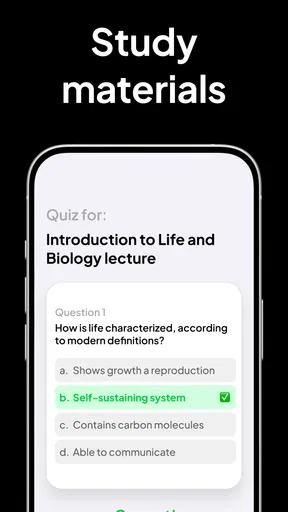
Different formats solve different problems. Notes are best when I need a quick overview or want to return to a particular explanation. Flashcards are more useful when the subject contains terms, formulas, dates or definitions that need repeated recall. Quizzes help me discover whether I can produce an answer without looking at the material first.
The podcast option is a particularly practical idea for review. I can use an audio version when walking or doing a routine task, although I would not rely on it for the first serious study pass. Audio review works better after I already know the structure of the topic. It reinforces connections, but it is less convenient than written material when I need to compare details or inspect a diagram.
This variety also makes the app more suitable for different learning habits. Someone who dislikes making cards manually can begin with generated prompts. Someone who prefers listening can revisit the lesson in a more conversational form. I appreciate that the same lecture can become several entry points instead of forcing every learner into one method.
What using it feels like after class
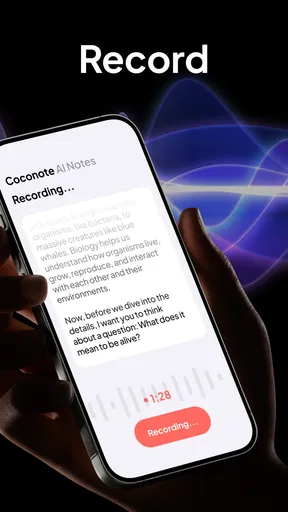
My practical workflow would start before the lecture rather than after it. I would open the app, check that the phone has enough battery and place it where the speaker can be heard clearly. The quality of the source matters: an unclear recording gives the app less to work with, so a quiet position near the lecturer is more valuable than any later editing.
During class, I would avoid trying to write every sentence while recording. The point is to let the app preserve the flow of the explanation while I concentrate on examples, diagrams and comments that may not be obvious from the audio alone. I would still make a few personal marks, especially beside anything the teacher emphasizes or says is likely to matter in an assessment.
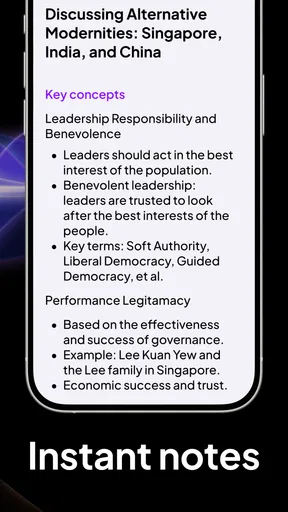
After the session, I would first read the notes from beginning to end. I would look for missing context, unusual names, technical vocabulary and places where a sentence sounds too confident or too vague. This checking step is not busywork. It is where I turn an automatically prepared outline into something I can trust.
Next, I would use the flashcards selectively. Creating a large deck from every sentence can produce too much material, so I would keep cards for ideas that genuinely require recall. A good card should ask one clear question. If a generated card contains several facts at once, I would simplify it rather than memorizing a paragraph.
Then I would take the quiz before rereading everything. That order is important. Testing myself while the material is still slightly unfamiliar shows what I actually know. If I score poorly on a topic, I can return to the relevant note instead of reviewing the entire lecture from the beginning.
One less obvious use is to compare the formats rather than consume all of them. If the notes explain a topic clearly but the quiz questions feel shallow, I know the material may need my own questions. If the flashcards are useful but the audio version feels repetitive, I can skip the podcast and keep the more efficient format. The app gives me choices; it does not mean every output deserves equal time.
A realistic evening study routine
Imagine I attend a biology lecture after a full day of classes. My usual alternative would be to keep a rough notebook, photograph the board and promise myself that I will organize everything later. By evening, that promise is easy to postpone. With Coconote, I could record the lecture, review the generated notes on the same day and use a short quiz to identify the sections that need attention.
I might notice that I remember the broad process but confuse two related terms. That is a good moment to edit or focus the flashcards around the distinction. Later, while travelling home, I could listen to the podcast-style review. The following day, I would take the quiz again rather than simply replaying the lecture. This sequence turns one class into several brief contacts with the material.
The important benefit is not that the app eliminates work. It moves the work toward activities that are more useful than copying everything by hand. I still need to judge whether the notes are accurate, connect them to diagrams and solve problems independently. What I gain is a faster route from raw lecture audio to a structured revision plan.
Where the workflow needs care
Recording in a classroom also requires common sense. I would ask the lecturer or institution whether recording is allowed and avoid capturing private conversations before or after class. The app may be convenient, but convenience does not override classroom rules or other people’s privacy.
I would also keep the phone stable and avoid assuming that a recording made from the back of a noisy room will become perfect notes. Speakers interrupt one another, technical terms can be misheard and demonstrations may depend on something visible rather than spoken. For subjects built around equations, charts or laboratory procedures, my own written observations remain essential.
Another practical question is whether the app works for every kind of learning material. It is naturally better suited to spoken lectures, explanations and review sessions than to a course where most of the meaning is on slides, a whiteboard or in physical practice. In those situations, I would use it as a supplement, not as the complete record of the lesson.
The trade-offs behind the convenience
The main trade-off is control versus speed. Writing my own notes takes longer, but it forces me to decide what matters while the lesson is happening. Coconote lets me capture more and organize later, which is helpful when the lecturer moves quickly, but it can also encourage me to postpone understanding.
That makes the app a poor fit for someone who wants a completely automatic study solution. If I record every class and never review, correct or test myself, I have only accumulated material. The conversion from lecture to notes is useful because it supports a study habit; it cannot create that habit on its own.
I also would not choose it as my only tool for highly visual or calculation-heavy courses. A generated explanation may summarize the method, but I still need to work through examples with a pen, keyboard or specialist practice tool. For language learning, it may help capture explanations and vocabulary, while a dedicated language app may offer more focused pronunciation and spaced practice.
There is also a financial consideration. The app is free to download and use as a free education tool, but in-app purchases are present, so I would check which parts of my intended workflow are available without payment before building my entire study routine around it. The wide purchase range means the cost can matter more to a frequent user than to someone testing it occasionally.
Another trade-off is the temptation to accept polished wording too quickly. Well-presented notes can feel authoritative even when they need checking. I would compare important definitions, names and processes with the lecturer’s slides or textbook. For exam preparation, that extra verification is worth the few minutes it takes.
How it compares with familiar alternatives
A traditional voice recorder is simpler and gives me direct control over the original audio, but it does not turn that audio into a study sequence. A notebook offers stronger personal selection and often works better for diagrams, yet it is slower and easier to fall behind with. Manual flashcard apps give me precise control over every prompt, although I must create the cards myself.
Coconote sits between these options. It is more ambitious than a recorder and less manually demanding than building a complete deck from scratch. The compromise is that I must review the generated material and decide what deserves attention. I would choose a plain recorder when preserving the exact lecture is my only goal, and I would choose handwritten notes when the lesson depends heavily on visual reasoning. I would choose this app when the lecture itself is the main source and I want help turning it into several revision formats.
Compared with a standard note-taking app, its appeal is the study layer. A normal notes app may be better for combining typed text, personal observations and project planning in one place. Coconote is more focused on what happens after spoken educational content has been captured. That narrower focus is a strength for students, but it may feel unnecessary for people who already have a reliable manual system.
Who will get the most from it
I think the best users are students who regularly attend spoken classes, struggle to organize notes afterward or want more than one way to revisit a lesson. It can also suit adult learners, people taking online courses and anyone who understands material better after hearing it explained but needs written prompts for revision.
It is especially useful for the student who is good at attending class but inconsistent at converting attendance into review. The app creates a practical bridge: record, inspect the notes, test recall and return to the weak areas. That sequence is simple enough to repeat without requiring a separate planning system.
It may also help students who miss small details while writing. Instead of choosing between listening and copying, they can pay closer attention during class and organize the material afterward. I still recommend taking personal notes for diagrams, examples and questions, but the recording-based workflow can reduce the pressure to capture every spoken sentence.
I would be more cautious about recommending it to someone who dislikes recorded audio, studies mainly from books or needs strict manual control over every line of a revision deck. It is also not the right primary tool for a course where practical performance matters more than lecture content. In those cases, a conventional notebook, a problem-solving platform or a subject-specific resource may produce better results.
Small habits that make the results better
I would name each lecture clearly and review it while the subject is still familiar. I would not wait until the week before an exam to discover that several recordings are difficult to distinguish. A quick same-day check also lets me catch an unclear section while I can still remember what the lecturer meant.
I would turn only the most important ideas into flashcards and rewrite confusing prompts in my own words. This prevents the deck from becoming a second pile of notes. I would use quizzes as diagnosis rather than as a score to admire, marking every uncertain answer for another pass.
Finally, I would keep the original lecture and the generated materials in different mental categories. The recording is the source, the notes are an organized interpretation and the cards or quiz are practice tools. Treating them differently makes it easier to notice when a summary needs correction instead of letting a convenient format replace the lesson itself.
After spending time with the idea and its practical workflow, my view is positive but specific. Coconote is not valuable because it promises to do all studying for me. It is valuable because it reduces the distance between hearing a lecture and beginning meaningful revision. The app is free, rated for Everyone and developed by Quizlet Inc., but its real usefulness depends on whether I actively check and use what it produces.
I would recommend it to a friend who attends lecture-based courses and often ends the day with scattered notes or an untouched recording. I would explain the limitation honestly: record carefully, verify important details and do not treat generated cards as a substitute for solving problems or understanding the subject. Used that way, Coconote - AI Note Taker becomes a practical study companion rather than another place to store unfinished work.
Verdict
Strengths of Coconote - AI Note Taker
- Turns voice recordings into organized notes automatically.
- Useful for lectures, meetings, interviews, and study sessions.
- Search helps you quickly find details across saved notes.
- Can summarize long recordings into shorter, clearer overviews.
- Reduces the need to type while listening or participating.
Limitations of Coconote - AI Note Taker
- Transcription accuracy may drop with accents, noise, or multiple speakers.
- AI summaries can miss context or interpret statements incorrectly.
- Advanced features may require a paid subscription.
- Processing recordings can take time, especially for longer files.
- Sensitive recordings raise privacy concerns and should be reviewed carefully.
Other Releases by Quizlet Inc.
View All
Quizlet: More than Flashcards
Education4.7
Similar Picks in This Category
View All
Duolingo: Language Lessons
Duolingo4.7

Google Classroom
Google LLC2.8

Unacademy: Learn & Crack Exams
Unacademy3.2

Bible App for Kids
Life.Church4.4

Cake - Learn English & Korean
Cake Corp.4.7

Brainly: AI Homework Helper
Brainly4.5
Frequently Asked Questions
What is Coconote - AI Note Taker, and what can it do?
Coconote is an AI-powered note-taking app designed to turn spoken conversations, lectures, meetings, interviews, and imported recordings into organized notes. After processing audio, it can typically create transcripts, summaries, outlines, flashcards, quizzes, and other study materials. It is especially useful for students and professionals who want to spend less time typing and more time reviewing important information.
Does Coconote require an internet connection to work?
Most of Coconote’s main AI features require an internet connection because audio processing, transcription, and content generation are generally handled through online services. You may be able to record audio without being connected, depending on the version and device, but processing the recording could require Wi-Fi or mobile data later. Users should also consider upload times and data usage for long recordings.
How accurate are Coconote’s transcriptions and AI-generated summaries?
Coconote can save considerable time, but its results should not be treated as perfectly accurate. Recognition quality may vary with background noise, multiple speakers, accents, technical vocabulary, recording quality, and overlapping conversations. AI summaries can also omit context or misunderstand details. Before relying on the notes for exams, work decisions, or important records, review the transcript and correct any mistakes.
Is Coconote free to use, or does it include subscriptions and limits?
Coconote may offer free access with restrictions, while advanced features, extended recording or transcription limits, larger storage, and premium AI tools can depend on a paid subscription or in-app purchase. The exact pricing, trial terms, usage limits, and available features may change by platform or region. Check the current App Store or Google Play listing before downloading and starting a trial.
Is my recorded audio and personal information safe in Coconote?
Because Coconote processes recordings and creates notes from them, privacy is an important consideration before using the app for private meetings, classes, interviews, or sensitive work. Review its current privacy policy, data-retention practices, account settings, and any third-party AI processing disclosures. Always obtain permission before recording other people, and avoid uploading confidential information unless you understand how it is handled.
